AI legal compliance
How I integrated generative AI into Intapp Time, saving lawyers hours and firms millions by streamlining time entry narrative compliance
225,000 users | $150 b/yr in billing | 6 weeks to design
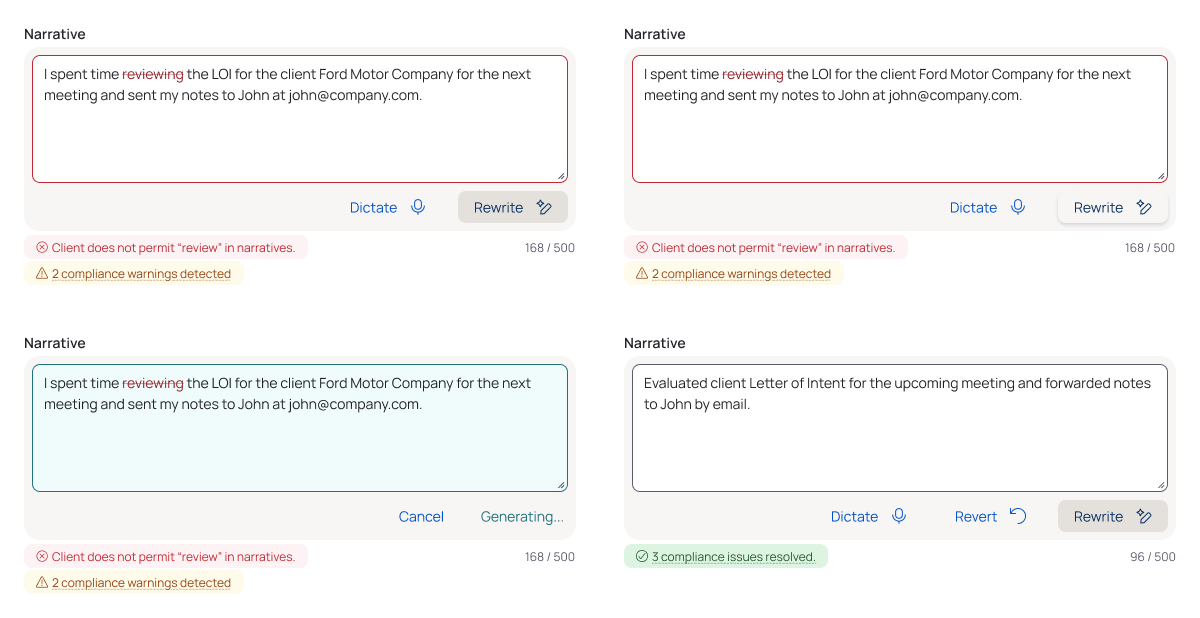
Lawyers and other professionals billing hourly track their time by creating time entries with a narrative detailing their work. Narratives must comply with firm rules and client contracts—and bills can have +400,000.
Enter Intapp Time’s AI-powered narrative rewrite. With one click, narratives become compliant with firm rules and client expectations.
Overview
Domains
Industries: Legal, consulting
Technology: AI (LLMs)
Time frame
6 weeks
My role
Senior designer, working with a lead designer, 2 product managers, and 26 engineers
UX design for end user & admin experience
UX research
Goals
For the business: Demonstrate Intapp Time’s superiority over competitors by saving firms millions in contested bills and non-compliant narratives
For the user: Quickly write compliant narratives without having to check firm rules, client rules, and grammar rules
Problems
There were 4 design problems to solve for, 3 for the users and 1 for my team:

End users (attorneys, paralegals) need to quickly draft and release time entries without having to learn complex UI

Law firms need to maintain consistent branding and prevent revenue loss from non-compliant or client-contested entries

Admin users need a way to configure what rules are followed—at firm, client, matter, and jurisdictional levels

Our team needed to ensure the AI was as accurate as possible, without blowing through token usage
Higher stakes: The team needed a quick turnaround to keep our biggest client—who’d recently started a pilot program with our biggest competitor because of their AI features
Research & Requirements
Personas
There were two types of users to account for: admin users and end users (“timekeepers”). Timekeepers are anyone tracking time, either their own or on behalf of someone else.
Timekeepers write narratives for their time entries to bill clients. Timekeepers include attorneys, paralegals, and legal assistants.
A timekeeper should be able to:
Know as quickly as possible if their narrative is breaking a rule
Quickly fix a non-compliant narrative
Be able to edit or revert to a previous version of their narrative
Admin users determine what rules narratives should follow. Rules can be firm-wide or client- and matter-specific.
An admin should be able to:
Find what rule they’re looking for
Immediately see what rules are enabled
Configure these aspects of the rule:
Whether it’s enabled
Its enforcement level
Design Iterations
Admin experience
The admin experience went through various iterations before settling on its list layout. For the product MVP, the team decided the admin experience would be for firm-level rules only.
V1: Basic data grid
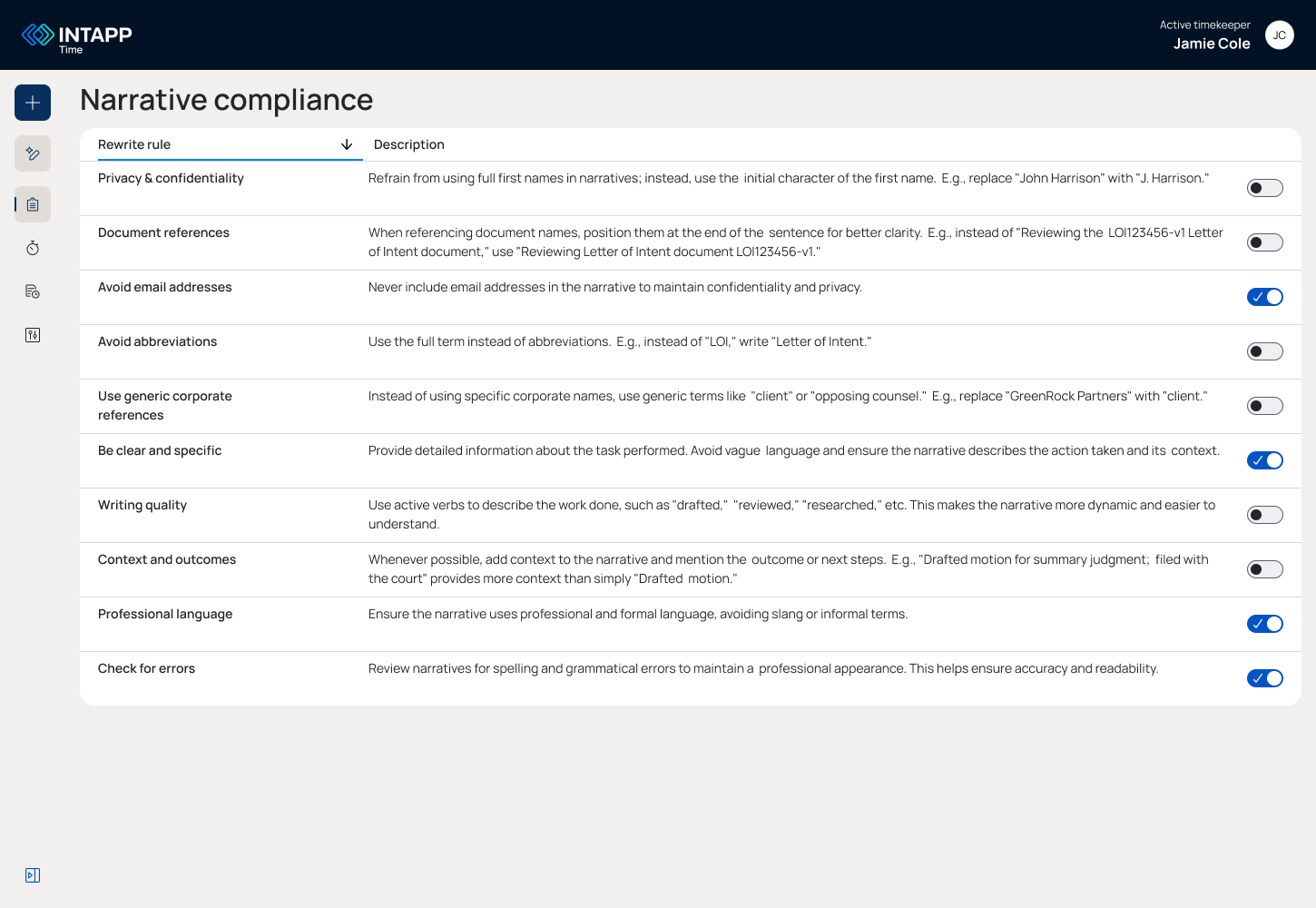
Lists out all firm rules
Shows enablement status
Does not allow configuration
Long horizontal text = difficult to scan


V2: Expandable cards
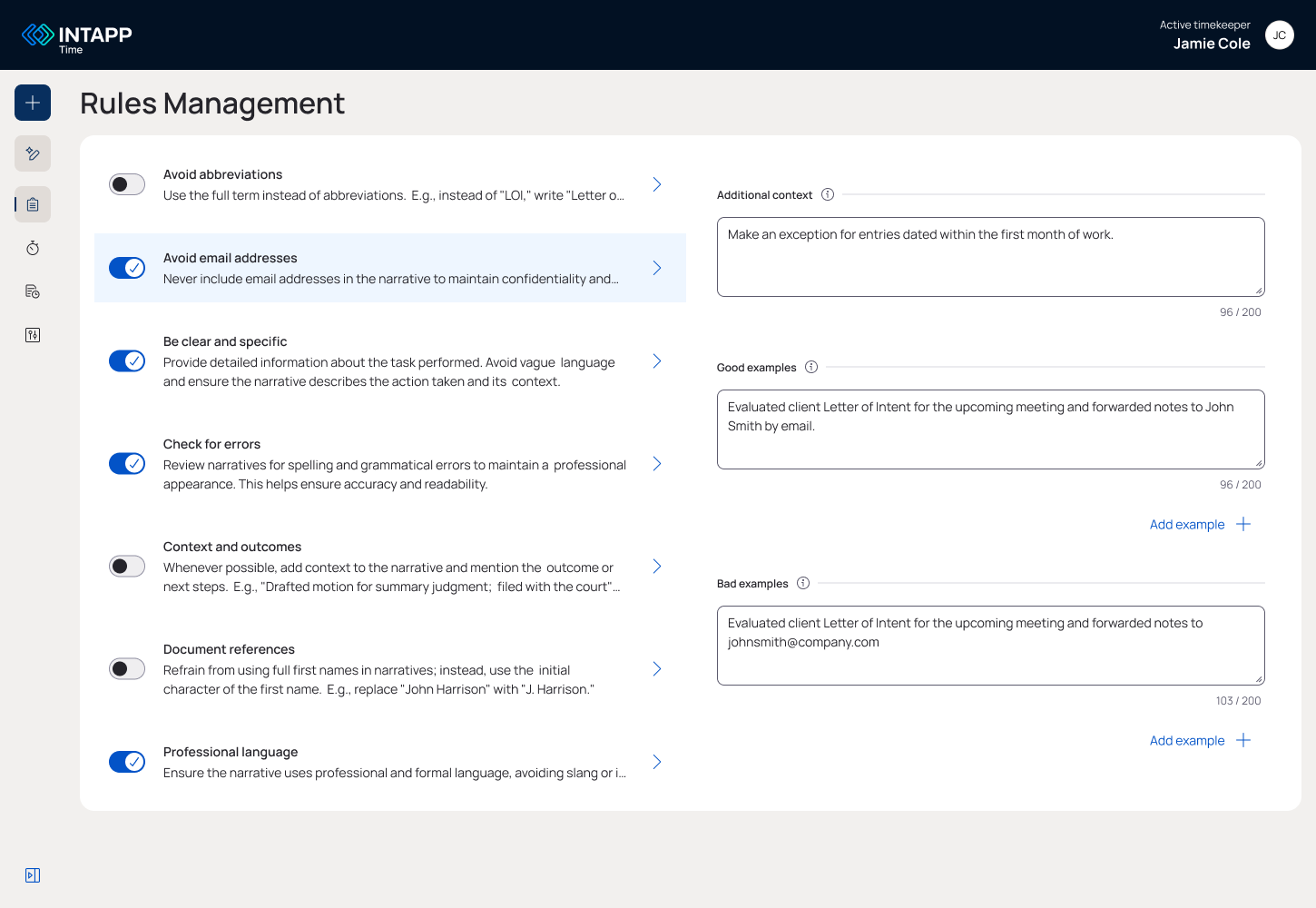
Lists out all firm rules
Shows enablement status
Allows configuration
Easy to scan
Configuration experience not scalable
Too much information for one page
V3: List view with overview
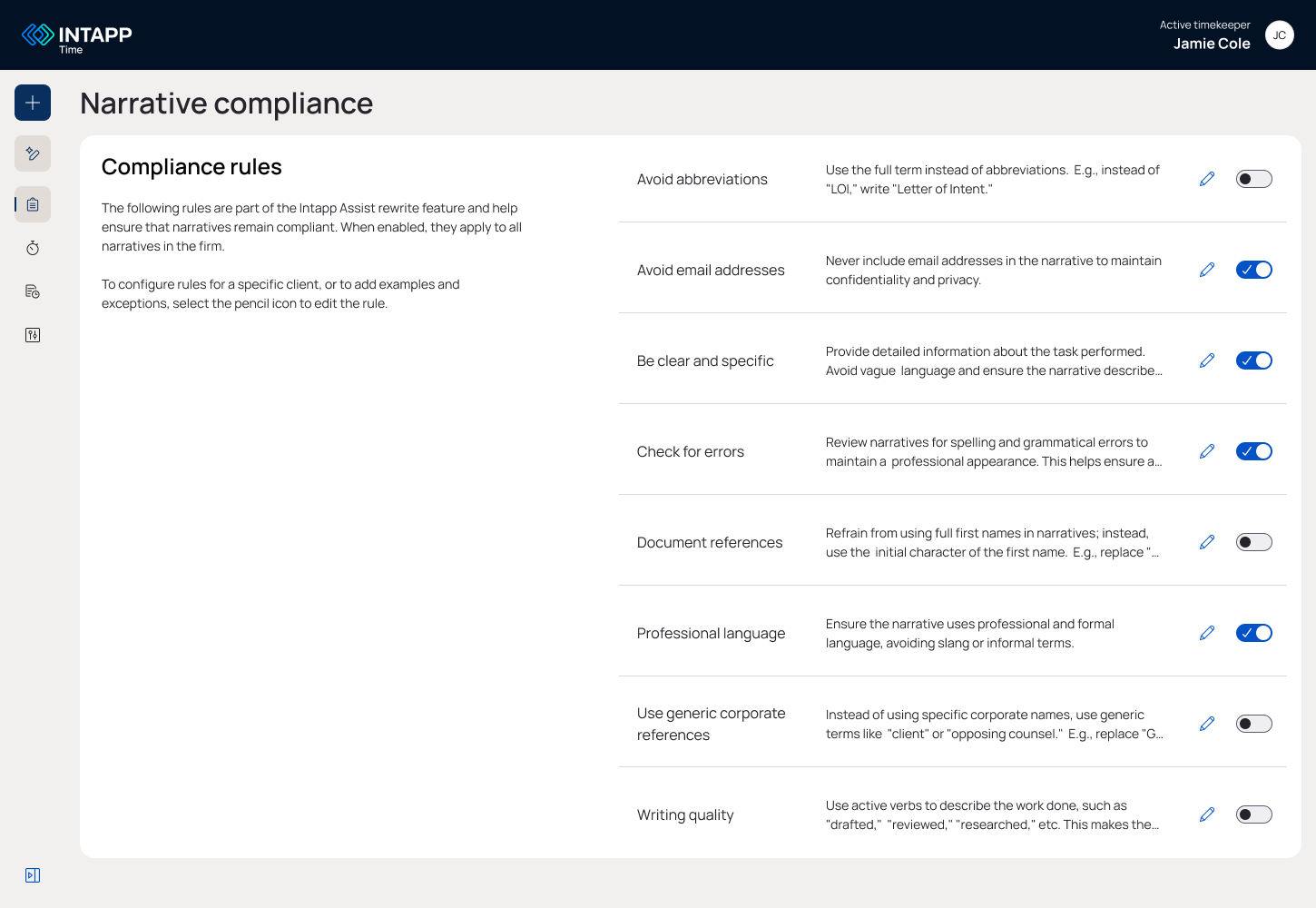
Lists out all firm rules
Shows enablement status
Allows configuration
Easy to scan
Configuration scalable (user clicks into new page)
Tolerable information density
Didn’t test well with users (was hard to scan)
V4: List view with testing (the winner!)
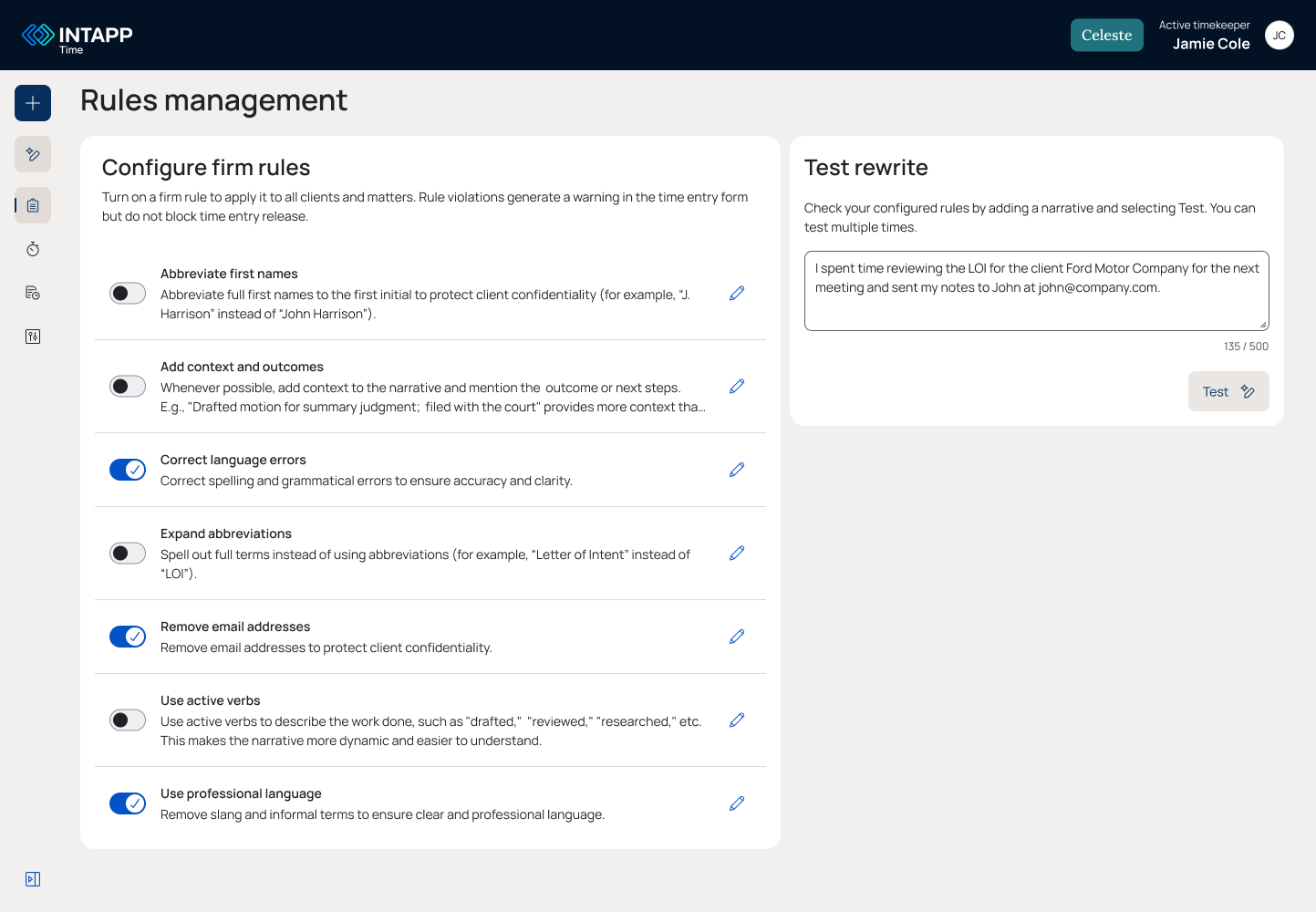
Lists out all firm rules
Shows enablement status
Allows configuration
Easy to scan
Configuration scalable (user clicks into new page)
Tolerable information density
Tested well with users
Added widget to test configurations (after feedback)
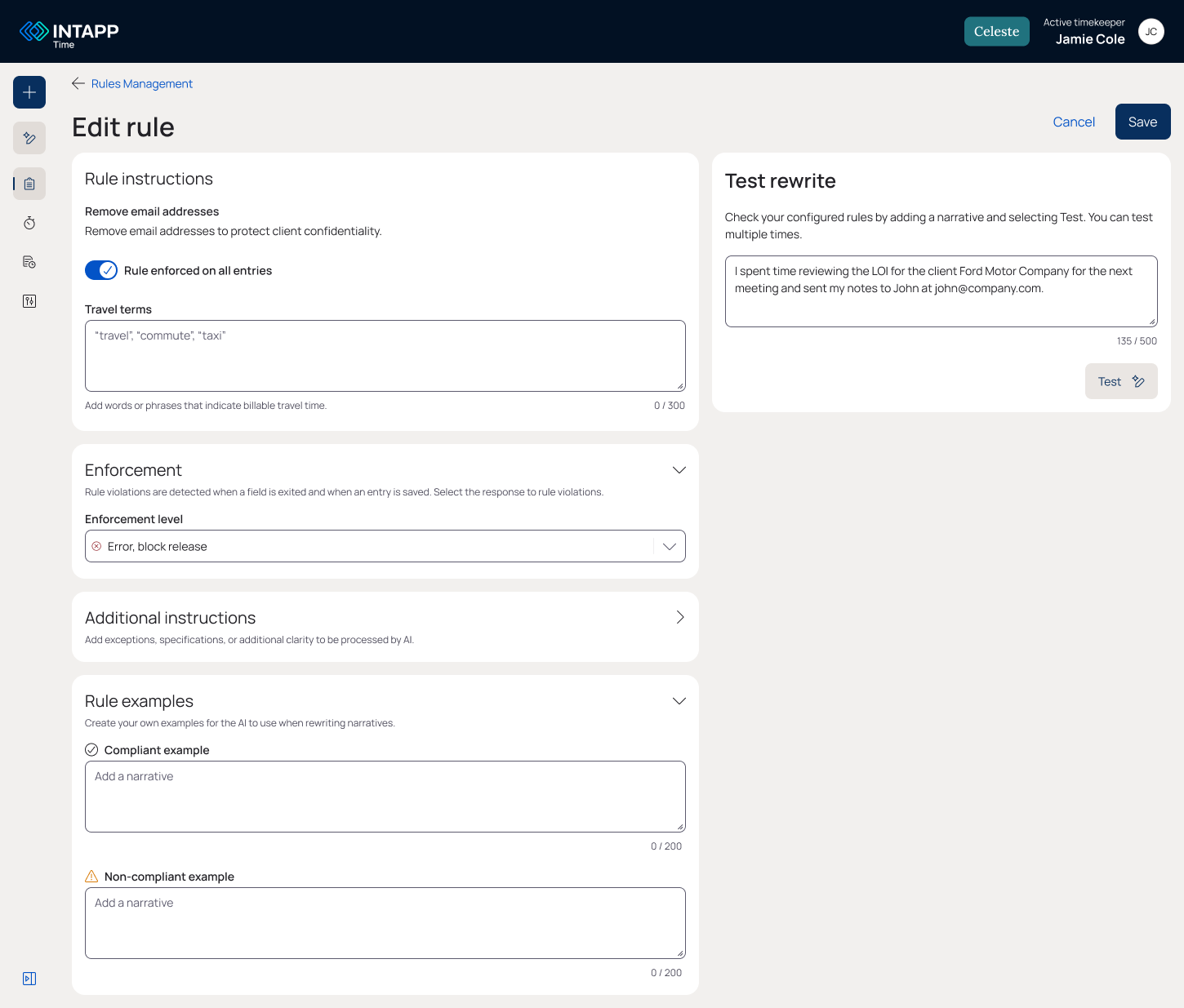
The Edit a rule page was added when I realized that rule configuration could be very complex.
Here, the user can add good and bad examples of narratives to train the AI on what to look for.
The timekeeper end user needs a way of knowing what rules or guidelines their narrative violates. I used existing design patterns around tool tips, warnings, and loading states.
Timekeeper end user experience
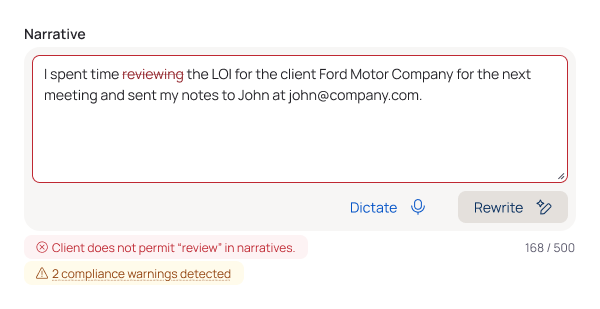
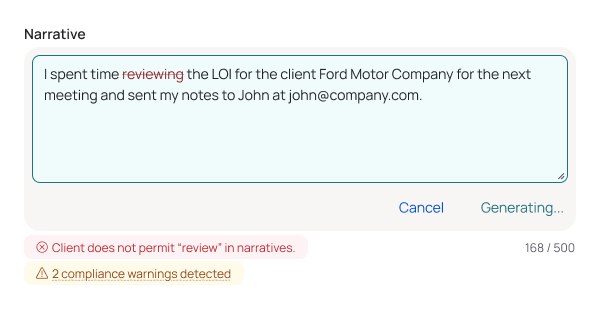
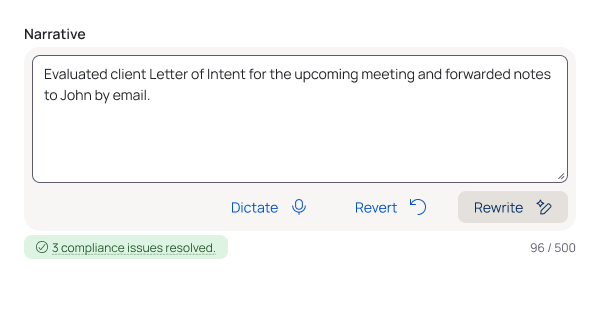
User testing was done ad hoc in 30-minute feedback sessions with users, product management, and client success.
Final design
Admin experience
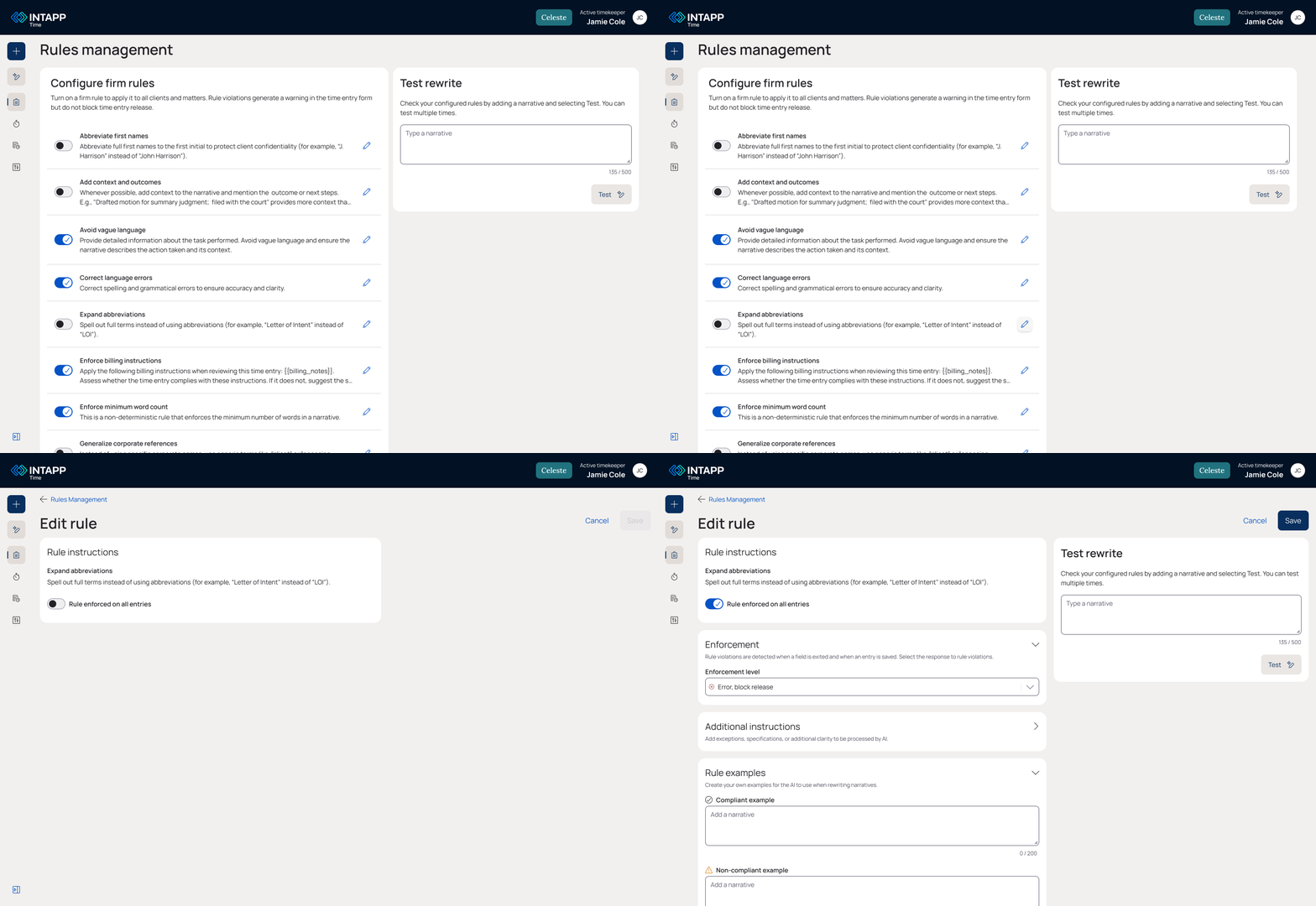
Admins can:
Immediately see all their firm rules
Configure a rule’s
Enablement
Enforcement level
Add example narratives to train the AI
From user feedback, we added:
Test narratives with their configured rules
Add example narratives and additional instructions
Timekeeper experience
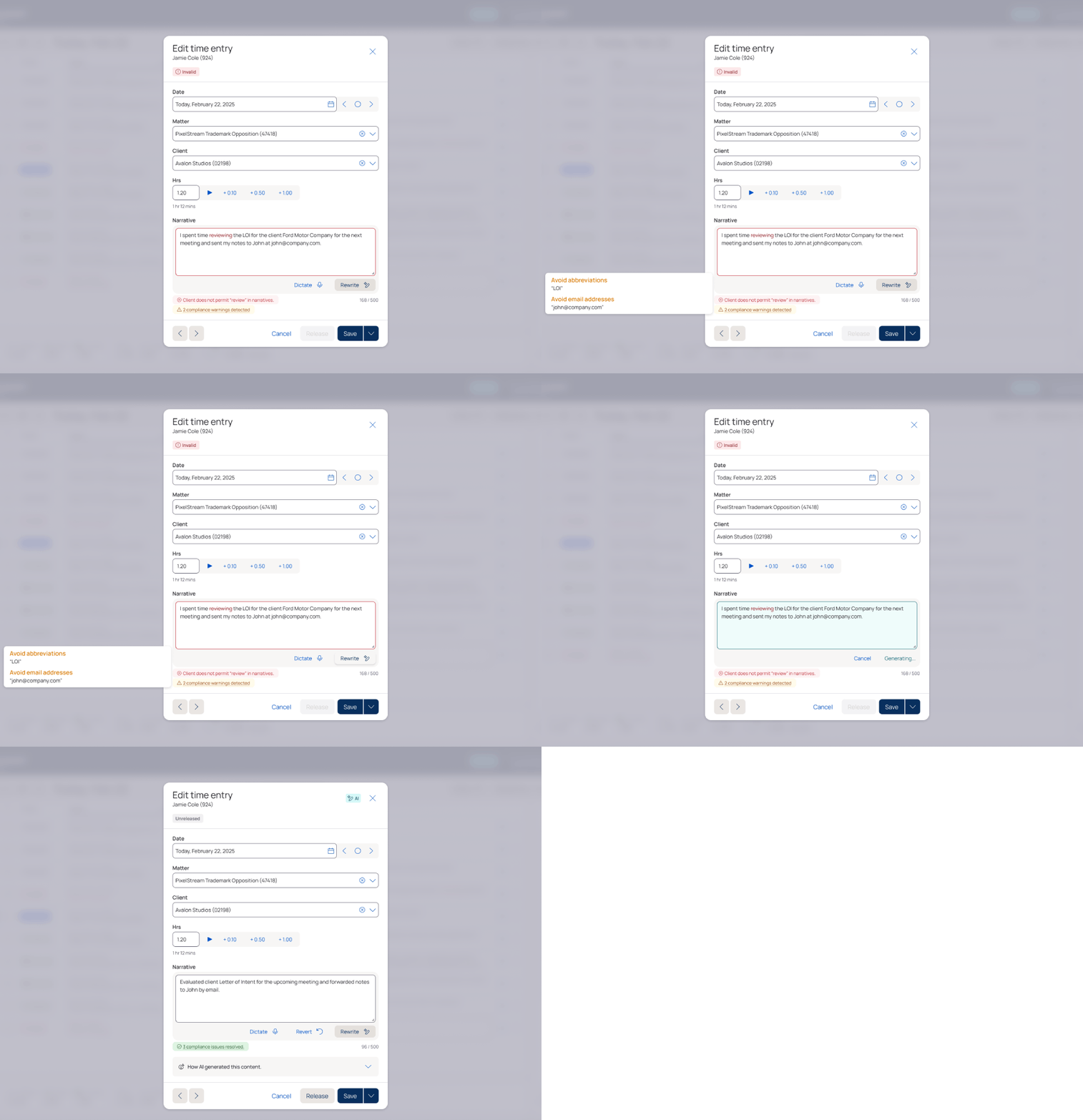
Timekeepers can:
Know as quickly as possible if their narrative is breaking a rule
Quickly fix a non-compliant narrative
Be able to edit or revert to a previous version of their narrative
From user feedback, we added:
Timekeepers can see a tool tip of the exact rules their narrative violates
Impact
Better time entry governance
Admins can set rules that maintain consistency and compliance across all narratives.

Less revenue loss
Fewer non-compliant entries means fewer contested bills from firm clients.

Improved AI trust
Using AI transparently and effectively demonstrated its value to apprehensive users

More competitive advantage
Intapp’s new AI features prove its mettle against less robust competitors.
In the press
“The Intapp Time Horizon release is very intuitive and won’t require us to retrain our lawyers… Our users really like the quick add functionality [and] the ability to use AI to create narratives.”
— Brian Donato, CIO at Vorys
“In professional and legal services, every billable minute contributes to revenue generation, and that’s why you need a reliable timekeeping platform like Intapp Time. It integrates with key systems and enforces compliance from the moment of entry.”
— Megha Agarwal, in a review for NeosAlpha
Lessons learned
Every project teaches me something new about design. Here are some takeaways from working on Intapp’s AI compliance:
Nail terminology first, then architecture, then everything else. There was a lot of back-and-forth about the admin experience. What would we call it? Where in the setting architecture would it live? I should have aligned the team sooner on those basics before diving into the design.
New technologies exacerbate old habits. Product management was ambitious about finishing this feature to compete with a startup. But as the team discovered AI’s limitations, we had to pull back on some goals—for example, AI hallucinates often enough that we added the Additional Instructions + Examples sections to keep prompts as specific as possible.
AI can’t solve fundamental design flaws. For the timekeeper experience, the real problem people had was knowing what rules their narratives violated. I added a tool tip listing the rules last minute, but I wish I’d had the time to rethink the structure of the entry form as a whole.
Next project
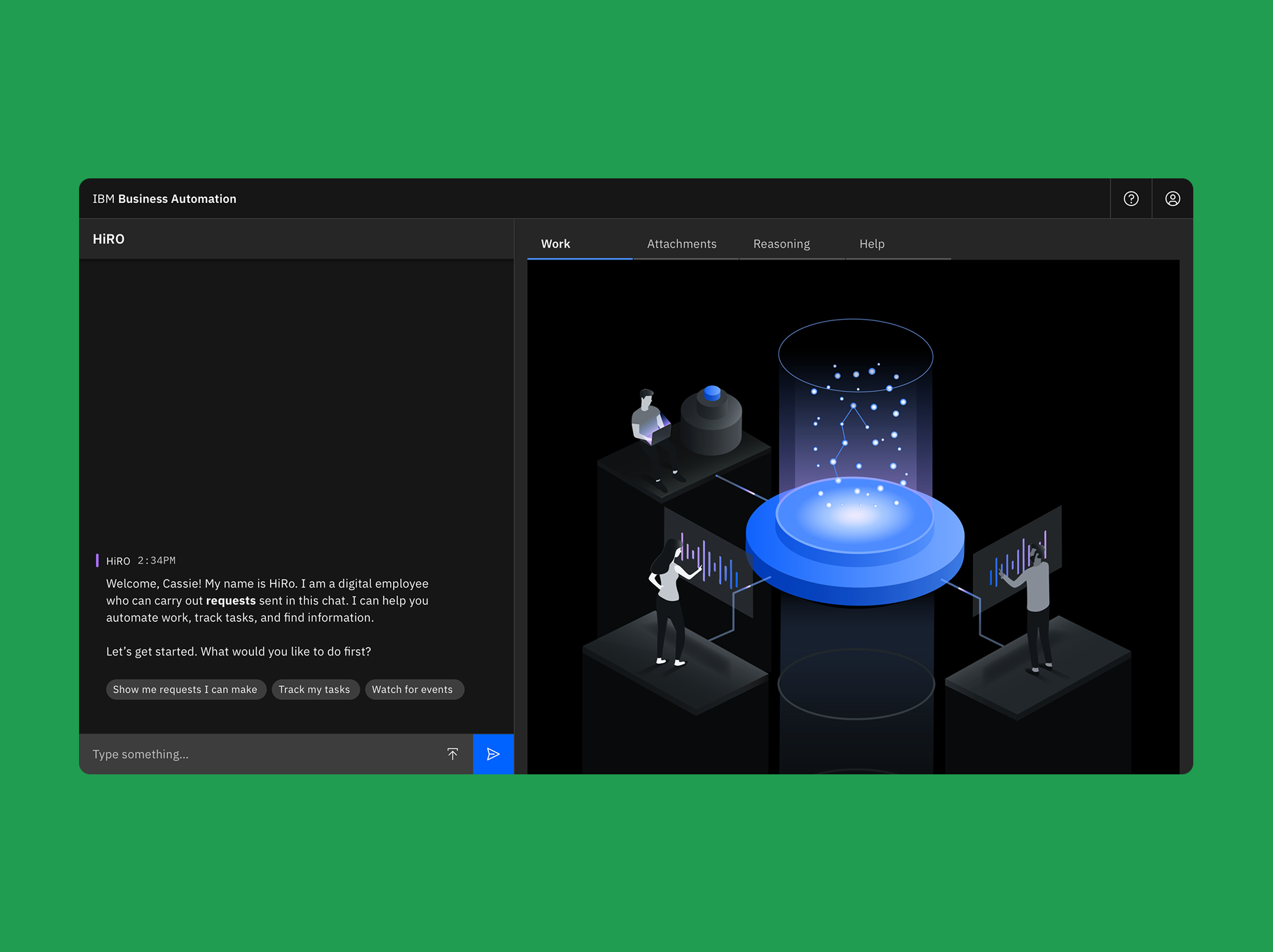
Watson Orchestrate
How conversation design and user research saved watsonx before it was watsonx
IBM | 0-1 in B2B SaaS